
Features
A map of what Xberg can do. Each section links to the guide or reference page with configuration details and code examples.
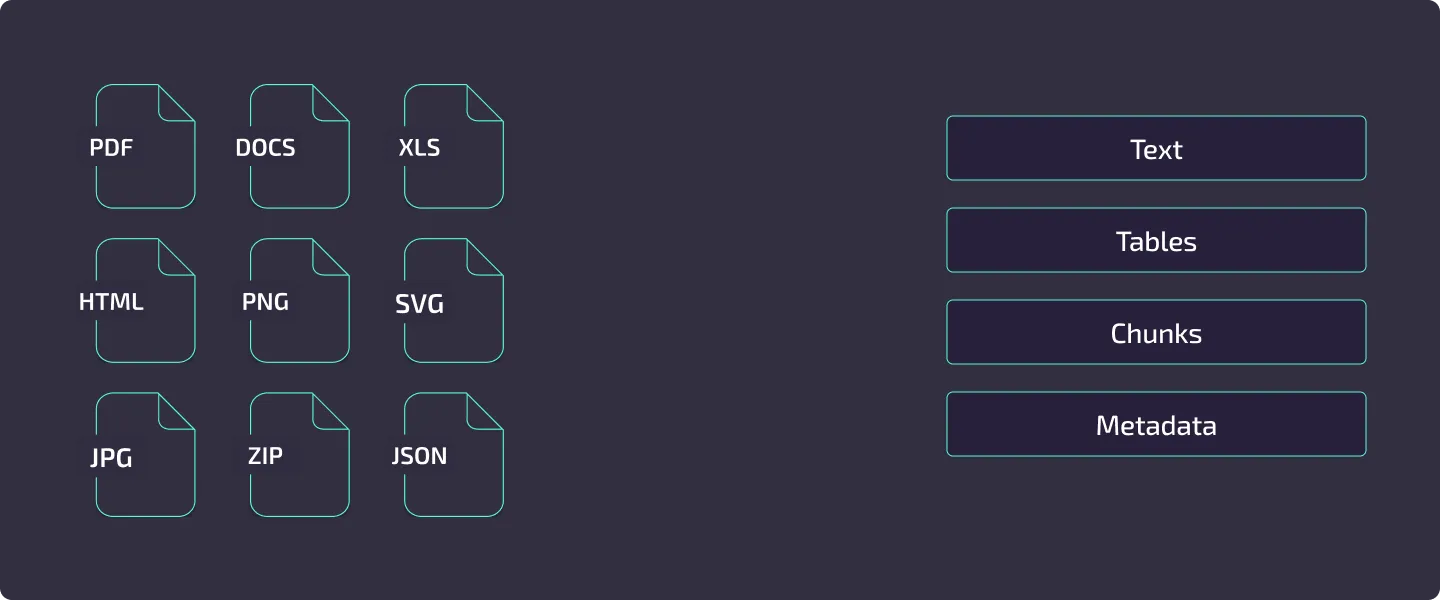
Format Support
Section titled “Format Support”107 file formats across 140 unique file extensions, with 53 compatibility MIME aliases, are handled by native Rust extractors — no LibreOffice or other external tools required.
.pdfWord .docx .docPages .pagesPowerPoint .pptx .ppt .ppsKeynote .keyOpenDocument .odt .odpPlain text .txtMarkdown .mdDjot .djot .djMDX .mdxRTF .rtfreStructuredText .rstOrg .orgHangul .hwp .hwpx.xlsx .xls .xlsm .xlsb .xltmNumbers .numbersOpenDocument .odsCSV .csvTSV .tsvdBASE .dbf.jpg .jpegPNG .pngGIF .gifBMP .bmpTIFF .tiff .tifWebP .webpJPEG 2000 .jp2 .jpg2 .j2c .j2k .jpcJBIG2 .jbig2PNM .pnm .pbm .pgm .ppmHEIC .heic .heicsHEIF .heif .heifs .hifAVIF .avifAVCS .avcs.mp3 .mpgaM4A .m4aWAV .wavWebM audio .webmMP4 audio track .mp4 .mpg4 .mp4v .m4vMPEG audio track .mpeg .mpg .mpe .m1v .m2vWebM audio track .webmEnable the transcription feature and set a transcription config block to extract Whisper ONNX transcripts from audio files and video audio tracks. See Audio and Video Transcription.
.emlMSG .msg.html .htmXHTML .xhtml .xhtXML .xmlSVG .svg.jsonGeoJSON .geojsonKML .kmlYAML .yamlTOML .tomlSQLite .sqlite .sqlite3 .dbGeoPackage .gpkg .gpkx.zipTAR .tar .tgzGZIP .gz7-Zip .7zArchives are traversed recursively — Xberg extracts every document inside, including archives nested within archives, and extracts each with the appropriate format extractor. Traversal is bounded by configurable security limits (archive size, compression ratio, file count, and nesting depth) with zip-bomb detection. See Extraction Basics and the security limits reference.
.epubBibTeX .bibRIS .risCSL JSON MIME onlyLaTeX .texTypst .typ .typstJATS .jatsDocBook .docbookOPML .opmlFor the full format matrix with MIME types, extraction methods, and special capabilities, see the Format Support Reference.
Extraction Pipeline
Section titled “Extraction Pipeline”Every file flows through the same multi-stage pipeline:
flowchart LR A[Input File] --> B[MIME Detection] B --> C[Format Extractor] C --> D{OCR Needed?} D -->|Yes| E[OCR Engine] D -->|No| F[Post-Processing] E --> F F --> G[ExtractedDocument]- MIME detection – Xberg prefers bounded content inspection, then falls back to a supported filename extension.
Unknown or missing extensions are sniffed rather than rejected. Configure
mime_detection_policyto trust a supported extension or ignore extensions when your input boundary requires different behavior. - Format extraction – The extractor pulls text, tables, metadata, and optionally images from the file. PDF extraction uses xberg-native-pdf (pure Rust); Office formats use native XML or OLE/CFB parsers; images pass directly to OCR.
- OCR – When the extractor finds no text layer (or
force_ocris set), the file is routed to the configured OCR backend. The OCR result replaces or supplements the extracted text. - Post-processing – Validators, quality processing, chunking, embeddings, keyword extraction, and any registered post-processor plugins run in sequence.
- Caching – If caching is enabled, results are stored keyed by a content hash so repeated extractions skip the entire pipeline.
For a deep dive into each stage, see Extraction Pipeline.
Output Formats
Section titled “Output Formats”Xberg supports six built-in output formats: Plain text, Markdown, Djot, HTML, JSON, and DocTags. Registered renderers can add custom formats such as Graphviz DOT. The HTML renderer uses semantic kb-* CSS classes, five built-in themes, and CSS custom properties. See Output Formats for details.
OCR Engines
Section titled “OCR Engines”OCR backends are usable individually or chained into a quality-driven fallback pipeline.
Backend Comparison
Section titled “Backend Comparison”| Tesseract | PaddleOCR | Sceptre | |
|---|---|---|---|
| Languages | 100+ | 80+ (11 script families) | 8 EasyOCR Gen2 groups |
| Best for | General purpose, broad language coverage | CJK, complex scripts, high accuracy | CRAFT scene/document text with line geometry |
| Platform | Native and WASM targets | Native ONNX Runtime builds | ORT desktop/server; tract Android/iOS; opt-in Sceptre worker API on WASM |
| Install | System package (tesseract-ocr) |
Cargo feature paddle-ocr |
sceptre-ocr or sceptre-ocr-tract |
| Runtime | C library (Tesseract 4.0+) | ONNX Runtime | ONNX Runtime or tract; CPU-only |
| Models | OS language packs | Downloaded on first use | Desktop cache; required mobile asset paths; verified caller-supplied WASM bytes |
Multi-Backend Pipeline
Section titled “Multi-Backend Pipeline”When the paddle-ocr feature is enabled, Xberg automatically constructs a fallback pipeline: Tesseract runs first, and if the output falls below configurable quality thresholds (16 tunable parameters), PaddleOCR takes over. You can also define a custom ordering across supported backends.
The pipeline supports auto-rotate for page orientation detection (0/90/180/270 degrees) and per-stage language and backend-specific settings.
flowchart TD A[Image / Scanned Page] --> B[Primary Backend] B --> C{Quality Above Threshold?} C -->|Yes| D[Return Result] C -->|No| E[Fallback Backend] E --> F{Quality Above Threshold?} F -->|Yes| D F -->|No| G[Return Best Result]Document-Level Optimization
Section titled “Document-Level Optimization”Some OCR backends support document-level processing. When a file path is provided, the extractor can bypass the expensive page-by-page rendering stage and delegate the entire document to the OCR engine. This significantly reduces memory overhead and improves throughput for large PDFs and multi-page images.
For backend configuration, language selection, and PSM/OEM modes, see the OCR Guide.
Candle GLM-OCR
Section titled “Candle GLM-OCR”Pure-Rust VLM OCR wrapping the zai-org/GLM-OCR 0.9B-param vision-language model running natively through the candle transformer framework. No ONNX Runtime dependency. Ships compiled in by default in the published packages (Python, Node, Go, Java, C#, Ruby, PHP, Elixir, Kotlin/JVM, Zig, CLI/Docker) on Linux, macOS, and Windows — no feature flag needed.
Rust crate feature flag (for custom builds): candle-glm-ocr
Implies: candle-ocr, xberg-candle-ocr/glm-ocr, layout-detection
Deployment:
- CPU & Metal (macOS) — Full support
- CUDA (Linux/Windows with NVIDIA GPU) — Full support
- WASM, Android, iOS, Dart, Swift — Excluded (candle not available on these targets)
Model & performance:
- Model size: ~3 GB on first download; cached at
~/.cache/huggingface/ - Default layout mode:
paired— PP-DocLayout-V3 detects regions, per-region task-specific OCR (ocr/table/formula/chart/caption), outputs merged into reading-order markdown - Alternative mode:
whole_page— Single OCR pass over entire page with optional task override - Metal dtype: F32 (BF16 matmul unavailable in candle 0.10)
Configure via --ocr-backend candle-glm-ocr or ocr.backend = "candle-glm-ocr" in config. Set layout mode and device via backend_options: {"layout_mode":"paired"}, {"layout_mode":"whole_page"}, {"device":"metal"}, {"device":"cuda"}.
Candle DeepSeek-OCR
Section titled “Candle DeepSeek-OCR”Pure-Rust VLM OCR combining SAM, CLIP, Qwen2, and DeepSeek-V2 MoE architecture. Advanced document understanding with multilingual support. No ONNX Runtime dependency. Ships compiled in by default in the published packages (Python, Node, Go, Java, C#, Ruby, PHP, Elixir, Kotlin/JVM, Zig, CLI/Docker) on Linux, macOS, and Windows — no feature flag needed.
Rust crate feature flag (for custom builds): candle-deepseek-ocr
Implies: candle-ocr, xberg-candle-ocr/deepseek-ocr
Deployment:
- CPU & Metal (macOS) — Full support
- CUDA (Linux/Windows with NVIDIA GPU) — Full support
- WASM, Android, iOS, Dart, Swift — Excluded (candle not available on these targets)
Model & performance:
- Model size: 6.7 GB (BF16 weights) on first download, auto-downloaded from a checksum-pinned
revision of
deepseek-ai/DeepSeek-OCR; cached at~/.cache/huggingface/(orHF_HUB_CACHE/HUGGINGFACE_HUB_CACHE/HF_HOME) — nobackend_options.model_pathrequired - Fine-grained layout detection, table region recognition, text extraction with confidence scores
- Pages wider or taller than 640 px are tiled into 640 px local-crop tiles (the reference “Gundam” mode) in addition to the 1024 px global view, so small text keeps its resolution
- Dtype auto-selects per device (override via
backend_options.dtype): CPU F32, CUDA BF16, Metal F16
Configure via --ocr-backend candle-deepseek-ocr or ocr.backend = "candle-deepseek-ocr" in config. Set device via backend_options: {"device":"metal"}, {"device":"cuda"}.
Attribution: Model vendored from jhqxxx/aha (Apache-2.0). See ATTRIBUTIONS.md.
Candle PaddleOCR-VL 1.5
Section titled “Candle PaddleOCR-VL 1.5”Pure-Rust VLM OCR. PaddleOCR-VL 1.5 vision-language model with SigLIP+Ernie integration. Fast multilingual document OCR with strong CJK support. No ONNX Runtime dependency. Ships compiled in by default in the published packages (Python, Node, Go, Java, C#, Ruby, PHP, Elixir, Kotlin/JVM, Zig, CLI/Docker) on Linux, macOS, and Windows — no feature flag needed.
Rust crate feature flag (for custom builds): candle-paddleocr-vl
Implies: candle-ocr, xberg-candle-ocr/paddleocr-vl
Deployment:
- CPU & Metal (macOS) — Full support
- CUDA (Linux/Windows with NVIDIA GPU) — Full support
- WASM, Android, iOS, Dart, Swift — Excluded (candle not available on these targets)
Model & performance:
- Model size: ~1 GB on first download; cached at
~/.cache/huggingface/ - Lightweight architecture optimized for speed and accuracy on scanned documents
- CPU dtype: F32; CUDA dtype: F16
Configure via --ocr-backend candle-paddleocr-vl or ocr.backend = "candle-paddleocr-vl" in config. Set device via backend_options: {"device":"metal"}, {"device":"cuda"}.
Attribution: Model vendored from jhqxxx/aha (Apache-2.0). See ATTRIBUTIONS.md.
Candle VLM-OCR Umbrella
Section titled “Candle VLM-OCR Umbrella”The candle-vlm-ocr feature aggregates all Candle VLM-OCR backends: candle-deepseek-ocr, candle-paddleocr-vl, candle-glm-ocr, and candle-trocr. Use this aggregate to enable all pure-Rust vision-language OCR options in a single feature flag.
Processing Features
Section titled “Processing Features”Optional post-extraction steps, each configured independently through ExtractionConfig.
For RAG Pipelines
Section titled “For RAG Pipelines”Content Chunking – Split extracted text into sized chunks for LLM consumption. Strategies include recursive (paragraph/sentence/word splitting), semantic, and Markdown-aware chunking that preserves heading hierarchy. Chunks can be sized by character count or by token count using any HuggingFace tokenizer.
Embeddings – Generate vector embeddings locally using FastEmbed. Choose from preset models ("fast", "balanced", "quality") or any FastEmbed-compatible model. Embeddings are generated in-process with no external API calls.
Page Tracking – Extract per-page content with byte-accurate offsets for O(1) page lookups. Chunks are automatically mapped to their source pages, enabling precise citations in retrieval systems. Supported for PDF (byte-accurate), PPTX (slide boundaries), and DOCX (best-effort page breaks). See Extraction Basics for usage.
PDF Hierarchy Detection – Detect document structure from PDFs using K-means clustering on block characteristics (font size, weight, indentation, position). Blocks are assigned to semantic levels (title, section, subsection, paragraph) without relying on explicit heading tags. See the Output Formats Guide.
PDF Page Rendering – Render individual PDF pages as PNG images for thumbnails, vision model input, or custom processing pipelines. Memory-efficient iterator renders one page at a time. Configurable DPI (default 150). Available across all language bindings. See Extraction Guide.
LLM-Powered Intelligence
Section titled “LLM-Powered Intelligence”Xberg integrates with 165 LLM providers including local inference (Ollama, LM Studio, vLLM, llama.cpp) via liter-llm to unlock three new capabilities that complement the local extraction pipeline.
VLM OCR – Vision language models as an OCR backend
Use OpenAI GPT-4o, Anthropic Claude, Google Gemini, or any vision-capable model as an OCR engine. VLM OCR delivers superior accuracy on low-quality scans, handwriting, Arabic/Farsi scripts, and complex layouts where traditional OCR struggles. Configure via ocr.backend = "vlm" with ocr.vlm_config in your extraction config or xberg.toml.
Structured Extraction – Extract typed JSON from documents using a schema
Provide a JSON schema and an optional Jinja2 prompt template in ExtractionConfig.structured_extraction; unified extract returns conforming structured data in the extraction result. Supports strict mode with automatic additionalProperties sanitization for cross-provider compatibility.
{ "type": "object", "properties": { "invoice_number": { "type": "string" }, "total": { "type": "number" }, "line_items": { "type": "array", "items": { "type": "object", "properties": { "description": { "type": "string" }, "amount": { "type": "number" } } } } }}VLM Embeddings – Provider-hosted embedding models
Use provider-hosted embedding models (for example, openai/text-embedding-3-small, mistral/mistral-embed) as an alternative to local ONNX models. Works through the existing /embed API endpoint, embed_text MCP tool, and embed CLI command with --provider llm.
Custom Jinja2 Prompts – Minijinja template engine for LLM prompts
Customize the prompts sent to LLMs with Minijinja templates. Available variables for structured extraction: {{ content }}, {{ schema }}, {{ schema_name }}, {{ schema_description }}. For VLM OCR prompts: {{ language }}. Override the default prompt per-request or in configuration.
LlmConfig and StructuredExtractionConfig are part of the generated binding surface. Use the per-language API reference to confirm representation and package support for your target. Five environment variables (XBERG_LLM_MODEL, XBERG_LLM_API_KEY, XBERG_LLM_BASE_URL, XBERG_VLM_OCR_MODEL, XBERG_VLM_EMBEDDING_MODEL) provide zero-code configuration.
Document Enrichment
Section titled “Document Enrichment”Named-Entity Recognition – Detect people, organisations, locations, dates, money, percentages, emails, phones, URLs, and caller-supplied zero-shot labels via xberg-gliner (ONNX artifacts from xberg-io/gliner-models) or any liter-llm provider. Results populate ExtractedDocument.entities. See the NER Guide.
Redaction & Anonymisation – Late-stage post-processor that rewrites content, formatted_content, chunks, entities, summary, translation, and page classifications. Pattern engine covers emails, phones, SSNs, credit cards, IBANs, IP addresses, SWIFT/BIC, postal codes, dates of birth; pair with NER for PERSON / ORGANIZATION / LOCATION. Strategies: mask, hash, token-replace, drop. Caller can supply literal terms and regex patterns. See the Redaction Guide.
Document Summarisation – Pure-Rust TextRank (extractive, local, deterministic) or any liter-llm provider (abstractive). Result on ExtractedDocument.summary. See the Summarisation Guide.
Document Translation – Translate content, formatted_content, and per-chunk text into a BCP-47 target language with any liter-llm provider. Optional Markdown/HTML preservation. Result on ExtractedDocument.translation. See the Translation Guide.
Page Classification – Per-page LLM classification against caller-supplied labels. Single-label or multi-label. Result on ExtractedDocument.page_classifications. See the Page Classification Guide.
VLM Image Captions – Describe extracted images with any vision-capable liter-llm provider. Result on ExtractedImage.caption. See the Image Captions Guide.
QR-Code Detection – Pure-Rust rqrr decoder runs over extracted images. Result on ExtractedImage.qr_codes. Ships in wasm-target and android-target. See the QR Codes Guide.
For Search and Indexing
Section titled “For Search and Indexing”Keyword Extraction – Extract key phrases using YAKE (unsupervised, language-independent) or RAKE (fast statistical method). Configurable n-gram ranges and language-specific stopword filtering. See the Keyword Extraction Guide.
Language Detection – Identify 60+ languages with confidence scoring using fast-langdetect. Supports multi-language detection for documents with mixed content.
Metadata Extraction – Pull document properties (title, author, creation date), page/word/character counts, and format-specific metadata (Excel sheet names, PDF annotations).
For Code
Section titled “For Code”Code Intelligence – Extract functions, classes, imports, exports, symbols, docstrings, and diagnostics from 371 programming languages via tree-sitter. Results are available in ExtractedDocument.code_intelligence as a ProcessResult. Code files produce semantic chunks (function/class-aware) that bypass the text-splitter entirely. Configure content mode with CodeContentMode: chunks (default, semantic TSLP chunks), raw (source as-is), or structure (headings + docstrings only).
For Data Quality
Section titled “For Data Quality”Quality Processing – Unicode normalization (NFC/NFD/NFKC/NFKD), whitespace and line break standardization, encoding detection, and mojibake correction.
Token Reduction – Reduce token count while preserving meaning through TF-IDF-based extractive summarization. Three modes: light (~15% reduction), moderate (~30%), and aggressive (~50%).
Table Extraction – Structured table data from PDFs, spreadsheets, and Word documents with cell-level row/column indexing, merged cell support, and Markdown or JSON output.
Layout Detection
Section titled “Layout Detection”Detect and classify document regions using ONNX-based deep learning. Layout detection identifies 17 element types (text, tables, figures, headers, code, forms, captions, and more), enabling accurate region-aware extraction and structured table recovery.
RT-DETR v2 – The layout detection model that identifies document structure with high precision. Automatically selects and configures separate table structure models (TATR, SLANeXT variants, or SLANet-plus) for cell-level analysis within detected table regions.
Table Structure Recognition – When layout detection identifies a table, a configurable table structure model analyzes rows, columns, headers, and spanning cells for HTML recovery with colspan/rowspan support. Choose from:
- TATR (30 MB) — General-purpose, fast, default
- SLANeXT Wired/Wireless/Auto (365–737 MB) — Optimized for bordered/borderless tables with auto-detection
- SLANet-plus (7.78 MB) — Lightweight, resource-constrained environments
GPU acceleration via ONNX Runtime (CUDA, CoreML, TensorRT) significantly reduces inference time. Models are automatically downloaded and cached on first use. The published Docker images are CPU-only — see GPU Acceleration for building with GPU support.
Availability: Native builds that include ONNX Runtime, including the full windows-target aggregate. RT-DETR layout detection (and the wired/wireless table classifier) also runs off ONNX Runtime through the pure-Rust tract engine on wasm-target and android-target via the layout-tract feature; TATR, SLANeXT, and PP-DocLayout-V3 table-structure models stay ONNX Runtime-only.
For configuration and usage, see the Layout Detection Guide.
Plugin System
Section titled “Plugin System”The extraction pipeline and query-time APIs are extensible through six plugin categories:
flowchart LR A[File Input] --> B[Document Extractor Plugin] B --> C[OCR Backend Plugin] C --> D[Validator Plugin] D --> E[Post-Processor Plugin] E --> F[Renderer Plugin] F --> G[Output] H[Query + Documents] --> I[Reranker Backend Plugin] I --> J[Reranked Documents]| Plugin Type | Purpose | Example |
|---|---|---|
| Document Extractors | Add support for custom file formats or override defaults | Proprietary format parser |
| OCR Backends | Integrate cloud OCR services or custom engines | AWS Textract, Google Vision |
| Reranker Backends | Score query/document pairs for search ranking | Cross-encoder or provider API |
| Validators | Enforce quality standards on extraction results | Minimum word count check |
| Post-Processors | Transform or enrich results after extraction | PII redaction, custom metadata |
| Renderers | Convert document structures into output formats | Custom Markdown or HTML writer |
Plugins are registered programmatically through typed registries. Built-in plugins register at initialization when their Cargo feature is active; runtime configuration selects registered backends and processors.
For the architecture overview, see Plugin System. For implementation guidance, see Creating Plugins.
Deployment Modes
Section titled “Deployment Modes”| Mode | When to Use | Details |
|---|---|---|
| Library | Embedding extraction into your application | Import the package in Python, TypeScript, Rust, Go, Java/Kotlin JVM, Kotlin Android, Ruby, C#, PHP, Elixir, Dart, Swift, Zig, C, or Wasm |
| CLI | One-off extractions, scripting, CI pipelines | xberg extract document.pdf --format json – see CLI Usage |
| REST API | Multi-service architectures, language-agnostic access | xberg serve --port 8000 – see API Server Guide |
| MCP Server | AI agent integration (Claude Desktop, Continue.dev) | xberg mcp – stdio transport with JSON-RPC 2.0 |
| Docker | Reproducible deployments with all dependencies bundled | ghcr.io/xberg-io/xberg:latest – see Docker Guide |
Language Bindings
Section titled “Language Bindings”Polyglot bindings share the Rust core and expose the same generated types where the target platform supports the underlying feature.
Binding Tiers
Section titled “Binding Tiers”Full feature parity with async API – Rust, Python (PyO3), TypeScript/Node.js (NAPI-RS)
Full features, synchronous API – Go, Ruby, C#, Java, PHP, Elixir
Native FFI surfaces – C, Dart, Swift, Zig, Kotlin Android
TypeScript: Two flavors
- Native (
@xberg-io/xberg) — Full speed, complete feature parity (servers, plugins, config file discovery) - WASM (
@xberg-io/xberg-wasm) — Browser/edge runtime, 60–80% of native speed, no native dependencies required. Excluded features: ORT-dependent inference (paddle-ocr, embeddings, reranker, transcription), liter-llm/VLM features, server modes (api/mcp), CLI binary, tree-sitter code intelligence, and browser filesystem paths. Supported: pure-Rust extraction formats, Tesseract WASM OCR, RT-DETR layout detection and document-orientation through tract, chunking, keywords, language detection, stopwords, redaction, summarization, SVG, and QR-code detection. Sceptre tract OCR is available to source builds through the opt-insceptre-wasmfeature and a synchronous byte-fed API that applications run inside their own Web Worker; it is not part of the published default bundle.
Choose Native for server-side Node.js; choose WASM for browser or edge deployments.
Rust Feature Flags
Section titled “Rust Feature Flags”Rust builds are modular through Cargo features. The default feature set is tokio-runtime plus simd-utf8; enable format and analysis features explicitly for the surface you need.
| Category | Features |
|---|---|
| Format extractors | pdf, excel, office, hwp, hwpx, iwork, email, html, xml, archives, mdx, sqlite, svg, heic |
| OCR and ML | ocr, ocr-wasm, paddle-ocr, sceptre-ocr, sceptre-ocr-tract, layout-detection, embeddings, reranker, transcription, liter-llm |
| Text analysis | language-detection, chunking, quality, keywords, stopwords, diff, ner, redaction, summarization, translation, classification, captioning, qr-codes |
| Servers | api, mcp, mcp-http, otel |
| Bundles | formats, analysis, services, full, server, cli, wasm-target, android-target, windows-target |
Additional Rust Feature Flags
Section titled “Additional Rust Feature Flags”The table above covers the main entry points. These are lower-level or opt-in flags not otherwise documented — each enables narrower functionality and carries a specific cost (extra native dependency, platform restriction, or CI-untested status per Cargo.toml’s own comments).
| Feature | Enables | Cost / restriction |
|---|---|---|
notebook |
Jupyter .ipynb extraction |
Pure Rust, no extra deps; already included by office |
wordperfect |
.wpd extraction via vendored libwpd/librevenge |
Native C++ dependency (vendors boost); needs vcpkg zlib on Windows; native-only |
bedrock |
Forwards to liter-llm’s AWS Bedrock SigV4 model routing | Requires liter-llm; adds aws-credential-types + pure-Rust aws-sigv4 (no aws-sdk) |
candle-cuda / candle-metal / candle-accelerate / candle-mkl |
GPU/accelerator backend for candle VLM OCR (candle-ocr family) |
Must be paired with a candle-* OCR backend; CPU-only decode of the larger VLM models is impractically slow without one |
paddle-ocr-ort |
PaddleOCR via ONNX Runtime (native default engine) | Pulls in ort + ort-bundled prebuilt runtime download |
paddle-ocr-tract |
PaddleOCR via the pure-Rust tract engine, no ORT |
For no-ORT targets (Android x86_64 emulator); never enable alongside paddle-ocr-ort in the same build |
sceptre-ocr-ort / sceptre-ocr-tract |
Sceptre OCR’s ORT and pure-Rust tract engine variants | sceptre-ocr aliases to -ort; the two are additive but only one is needed per target |
sceptre-ocr-candle |
Hand-written CRAFT/CRNN forward pass over candle tensors | CPU-only by default (candle-core has default features off) |
sceptre-ocr-candle-metal / sceptre-ocr-candle-cuda |
Metal / CUDA acceleration for the sceptre candle backend | UNTESTED – Cargo.toml notes no CI leg builds or runs either combination |
ort-bundled |
Downloads the pyke prebuilt ONNX Runtime at build time | Dev-default strategy; the prebuilt requires glibc >= 2.38 to run |
ort-dynamic |
Loads ONNX Runtime dynamically at runtime via ORT_DYLIB_PATH |
Build-time only, no download; used where no static prebuilt exists (e.g. Intel macOS) |
coreml |
Explicit opt-in for the CoreML execution provider | macOS-only; not included in default, full, or any binding preset |
cuda |
Explicit opt-in for the CUDA execution provider | Requires a CUDA-enabled ONNX Runtime build (the plain prebuilt has no CUDA support); not in default/full |
tensorrt |
Explicit opt-in for the TensorRT execution provider | Requires a TensorRT-enabled ONNX Runtime build; not in default/full |
auto-rotate / auto-rotate-tract |
PP-LCNet document-orientation detection (ORT and pure-Rust tract variants) | -tract is the no-ORT sibling for Android x86_64/WASM; never enable both together |
tract |
Pure-Rust ONNX inference engine underlying every *-tract feature |
Additive alongside ORT on native targets; the sole inference engine on WASM and Android x86_64 |
chunking-tokenizers |
Token-count-based chunk sizing using any HuggingFace tokenizer | Adds tokenizers + hf-hub/reqwest model download |
static-embeddings |
Pure-Rust static (model2vec) dense embeddings, no ORT | The only dense embedder available on WASM/Android; native-only model download |
sparse-embeddings |
SPLADE sparse embeddings for hybrid dense+sparse retrieval | ORT-dependent, WASM-incompatible |
late-interaction |
ColBERT multi-vector (MaxSim) embeddings | ORT-dependent, WASM-incompatible |
enrichment |
Cloud-upstreamed generic overridable extraction defaults | Pure Rust, no deps; no domain-specific logic yet |
heuristics |
Hooks for heuristic-based extraction behavior | Pure Rust, no deps; currently a thin placeholder (text-layer-detection heuristics land under a separate future feature) |
keywords-yake / keywords-rake |
Individual keyword-extraction algorithms (unsupervised YAKE / statistical RAKE) | keywords enables both together; use these to pick just one |
markdown-footnotes |
Footnote and citation extraction (FootnoteConfig, Citation, etc.) |
Pure Rust, no deps |
ner-llm |
Zero-shot NER via any configured liter-llm provider | Requires liter-llm; no ORT needed |
ner-onnx |
NER via the xberg-gliner ONNX backend |
ORT-dependent; downloads models from Hugging Face on first use |
presets |
Built-in extraction preset format, registry, and resolver | Pure Rust, no native deps |
structured |
Enables ExtractionConfig.structured_extraction (LLM-driven typed JSON extraction against a caller-supplied schema) |
Requires liter-llm |
redaction-rehydrate |
Encrypted rehydration map capture for reversible PII redaction | Requires redaction; adds aes-gcm, scrypt, zeroize |
redaction-ml |
Couples NER into redaction for PERSON/ORG/LOC pattern matching | Requires redaction + ner |
summarization-llm |
Abstractive summarization via any liter-llm provider | Requires summarization + liter-llm (the base summarization feature is pure-Rust TextRank only) |
url-ingestion / url-ingestion-browser |
Fetch and crawl remote URLs as extraction input via crawlberg |
-browser adds crawlberg/browser for in-browser fetch (WASM); native url-ingestion needs crawlberg/native-runtime |
prometheus |
Opt-in Prometheus /metrics endpoint |
Requires both api and otel explicitly – neither implies the other |
mobile |
Deployment preset: formats + analysis + Tesseract ocr + tree-sitter + api-types |
Excludes all ORT-dependent ML (paddle-ocr, layout-detection, embeddings, reranker, transcription, auto-rotate) |
macos-intel-target |
Full feature parity on Intel macOS (full-no-heic + ort-dynamic) |
ORT dropped static x86_64-apple-darwin prebuilts after v2.0.0-rc.11, so this target loads ONNX Runtime dynamically instead |
Skipped as internal plumbing (pure marker/aggregate features with no independent behavior, or types-only
subsets already covered by their parent feature above): paddle-ocr-types, layout-types,
auto-rotate-types, transcription-types, embedding-presets, reranker-presets,
sparse-embedding-presets, late-interaction-presets, api-types, onnx-runtime,
ocr-pipeline, image-encode, url-config-types, tower-service, no-ort-target, formats-no-heic,
full-no-heic, simd-utf8, tokio-runtime, profiling, pool-metrics.
Package Installation
Section titled “Package Installation”pip install xberg # Core + Tesseract + PaddleOCRpip install xberg[all] # Everythingnpm install @xberg-io/xberg # Native (Node.js/Bun)npm install @xberg-io/xberg-wasm # WASM (browser/edge)[dependencies]xberg = { version = "1", features = ["pdf", "ocr", "chunking"] }gem install xberg # Rubygo get github.com/xberg-io/xberg/packages/go # Godotnet add package XbergIo.Xberg # C#For API details per language, see the API Reference.
Configuration
Section titled “Configuration”Four configuration methods, checked in this order:
- Programmatic – Construct
ExtractionConfigobjects in code (all bindings) - TOML –
xberg.toml - YAML –
xberg.yaml - JSON –
xberg.json
Config files are auto-discovered from the current directory, ~/.config/xberg/, and /etc/xberg/. Environment variables (XBERG_CONFIG_PATH, XBERG_CACHE_DIR, XBERG_OCR_BACKEND, XBERG_OCR_LANGUAGE) override file-based settings.
For the full configuration schema and examples, see the Configuration Guide.
AI Coding Assistants
Section titled “AI Coding Assistants”Xberg ships with an Agent Skill that teaches AI coding assistants the complete API across Python, TypeScript, Rust, and CLI. Install it with:
npx skills add xberg-io/xbergCompatible with Claude Code, Codex, Gemini CLI, Cursor, VS Code, Amp, Goose, Roo Code, and any tool supporting the Agent Skills standard. See the AI Coding Assistants Guide.
Next Steps
Section titled “Next Steps”- Installation – Install Xberg for your language
- Quick Start – Extract your first document in 5 minutes
- Architecture – Understand the Rust core and binding layers
- Development Workflow – Performance benchmarks and optimization guidance